
How to reach DSA2026 and what to bring
Dear ,
This email is to help you with getting to Dublin, to clarify where things are located in University College Dublin (UCD) and to remind you what you need to pack (if travelling from outside the UK).
What to bring to Dublin (or purchase when you get here)
If visiting from abroad, remember to bring a power adapter that fits the UK sockets (three pins). If you plan to show a PowerPoint or other presentation file(s), bring your files on a USB or a portable device.
Please bring your own reusable water bottle - Irish tap water is clean and drinkable.

Dublin, the capital city of Ireland, lies in the temperamental climate zone, which means that weather forecasts are as unreliable as governments. The best idea is to prepare for both blistering heat and a biblical flood (breathable layers accompanied by waterproof ones), and carry an umbrella at all times to fend off the elements (and unwanted admirers). Supermarkets, buses and trains tend to overdo air conditioning, so it;s a good idea to have an extra layer of clothing at hand.
You will need to bring Euros with you as Ireland uses the Euro. Please also note that Dublin Bus services;accept coins only if paying cash directly to the driver, and drivers do not provide change. Please note that tap-and-go is not a thing in the Irish public transport system.
Further travel advice is available on the Travel and Stay page of the website
Arrival - Where to go and when?
Pre-conference events start on Tuesday7 July but most delegates will arrive for the conference opening and first panel sessions on Wednesday 8 July. If you arrive early enough on Wednesday, please come to the conference venue to check in and attend the opening event.
If your panel is on Wednesday, ensure you come to reception to check-in from 10.30-17:00 to get your conference badge before looking for your panel room.
Internet access at UCD
Eduroam credentials can be used for accessing WiFi in Dublin – if your device has been used for accessing Eduroam anywhere in the world, you should be able to log on automatically. For those who need to log in anew, see the instructions on the UCD WiFi page - just ensure you have your username and password from your own institution available. Some devices may require additional configuration, see the UCD WiFi page for advice.
In addition there is a free 'WiFi Guest' network maintained by UCD for use by anyone not in the Eduroam club. The log-in is simply UCD Guest. You will need to authenticate the log in your browser.
Conference programme and timetable
DSA2026 will not offer a full printed programme (‘the book’) but a succinct printout with overall and panel timetables including times/locations of events, keynotes etc. However for full search functionality, we recommend using your device to view the DSA2026 website. The timetable page gives the when and where of a panel or event (including the number of sessions); you can also see the date/times/location of any panel when viewing that panel from the All panels view.
Preparing/using the online programme
We encourage delegates to peruse the online programme. Utilise the Search function to find colleagues/topics you are interested in. Star them to build a personal schedule. And for those who prefer a hard-copy, you can now click the PDF icon (from the starred view)to download/print off your personalised programme for the event.
Please note that if you are logged in when viewing the programme, you can star/favourite panels or papers you wish to attend/hear.
How to get to Dublin?
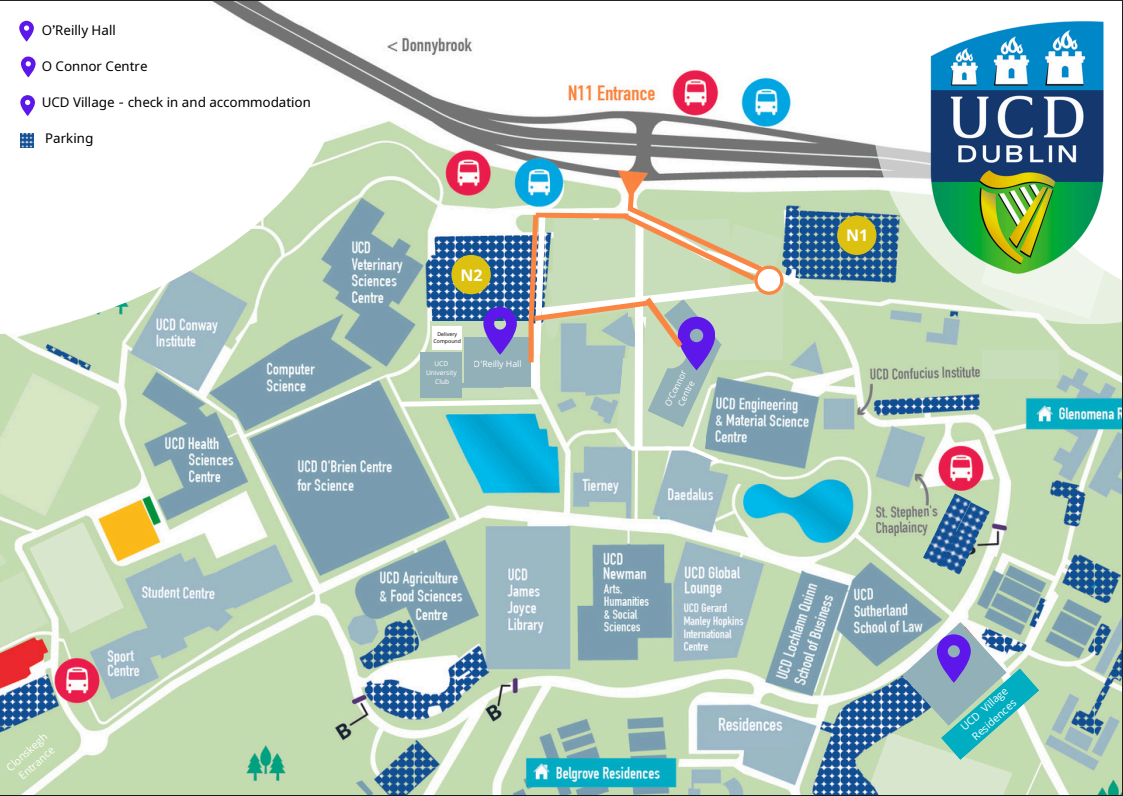
The conference takes place at the University College Dublin, Belfield, Dublin 4 D04 V184. Comprehensive information of how to get to Dublin and how to find the campus once you’re in the city is provided on our Travel page. This little map below shows the buildings we are using, surrounded by a number of other buildings in all directions.
Reception desk
On arrival at UCD, go through the main door of the brand new O'Connor Centre for Learning. The reception desk (also known as the registration desk) will be located in the ground floor foyer space. The desk will be staffed by DSA2026 volunteers wearing dark grey T-shirts carrying the DSA logo. On arrival at the Reception desk identify yourself to receive your nametag (badge) and be checked in; programme print-outs will also be available.
We will have a photographer on site to cover the event. If you do not want to be photographed, please ask for a ribbon at the registration desk and please wear that to let the photographer know.
The reception desk will be open: Tue 15:00 - 17:00, Wed 11:00-17:00, Thu 08:00-16:00 and Fri 08:30-15:15. Please do not try to check in before it opens.
If you are yet to settle your fees
f possible, please try to do this prior to arrival (at least by 7 July via card/PayPal. If you know for sure that you can only pay at the conference, but you are yet to inform us, please let us know now, so we know you are coming. This helps us predict catering numbers, reducing waste, and also reduces our stress levels.
All those who have not paid in advance, or have not told us that they can only pay in cash at the event will have to pay a £20 surcharge at the NomadIT office in room in the O'Connor Building room LG.04.
If paying on arrival, it must be in cash (GBP) Please note we cannot take card payments.
NomadIT office opening hours: Tue 15:00 - 17:00, Wed 11:00-17:00, Thu 08:30-17:00 and Fri 08:30-15:15.
Printing
If you need to print your conference paper, or a boarding pass or other short text-based document, this can be done for 1Euro/page at the NomadIT office.
Certificates of attendance, receipts of payment
Some funding bodies/institutions require proof of attendance from the delegate they have funded. We do not automatically print these for all delegates, but will email a signed, headed PDF certificate to all delegates after the conference is over. This may be preferable as papers easily crumple or get lost on the homeward journey. Each attending delegate can also download this certificate stating their involvement (panels convened, papers presented) from the login environment on our website, after the event is over. Once logged in, click Conference, find your registration and click on the "C" icon there.
If such a PDF really is not acceptable to your administration, please come to the NomadIT office (during a quieter moment) to request a printed and pen-signed certificate, and we will be happy to supply one. The same goes for receipts of payment.
Catering
Your registration includes coffee/tea (each day) and lunch (Thu & Fri)-all served at the at the O'Connor Building. A finger buffet & drinks will be served at the opening reception – in the O'Reilly. Catering will be located on the 1st and 2nd floors - if you find a catering station too clogged with queues, please ask student volunteers to point you to the other. The catering choices are vegan and vegetarian - and they should be marked in terms of allergies. If you need an allergy-specific meal, please email me straight away.
Please also note that all other catering outlets are commercial and do not serve conference lunches or coffee.
Panels, meetings and plenary events
Please use the DSA2026 timetable page to navigate the conference content. For quick reference as to when, where and how long a particular panel is, check the 'Panels' view in the timetable.
We recommend reading through the conference timetable on the website in advance, starring all panels, events and meetings you wish to attend. To do this you must be logged in. (Log in via the Log in link in the upper right corner and navigate to the timetable.) Apply the starred/personalised filter by clicking the star (next to the ‘Participants’ button), You can add such items to your calendar (so as to get reminders) using the calendar icons on the right side.
Study Group-curious and current members: please note your various meeting times Tuesday-Thursday.
Note the plenary events of Wednesday, Thursday, Friday and remember to come together to discuss all things DSA for the Annual General Meeting (AGM).
Publishers
Please make sure to pay a visit to the book exhibit from Bloomsbury Academic situated in the catering space on the 1st floor: Bloomsbury Academic and Bristol University Press.
You can also participate in the 'Publication strategies for students and early career researchers' to meet the publishing and journal editors for advice and tips how to get published in journals and books (Thursday 9 July at 13.00 in the O'Connor Building and Friday 27 at 12.45 in the same venue)
Those presenting
You will be fine, don’t worry! Nobody knows your research as well as you do. Have your files ready on a USB stick or other portable device. Try to go to your panel rooms 15 minutes before the session starts, to upload/download and check your files.
Please bring any files you wish to present to your panel room 15 minutes before the session, to upload from your USB stick/portable device and check.
You cannot present from your own computer as the hybrid delivery is set to work with the room’s main computer. A Zoom will be running (for your panel) on the room’s computer, so when you wish to show your files you will need to use the Zoom share-screen function, so that both those in the room and online will be able to see your files and you.
There will be a student volunteer team member present to assist - all will be well.
Those convening/charing
Please arrive 20 mins before the start of your panel to meet the conference volunteer, who will start the panel’s Zoom on the room’s computer and run through the hybrid aspect.
Presenters will arrive early to upload their presentations to the presentation computer, and remote presenters will want to also do a quick tech check. Please ensure you’ve read these guidelines and do your best to treat all participants (online as well as f2f) fairly.
Strict time-keeping is crucial to a good conference and is one of your responsibilities: please ensure each presenter gets their fair share of the time and do not run over into the breaks.
Timing of papers/sessions
Sessions are 90 mins long with up to four papers per session, some less. It is up to the convenors of each panel to decide how much time they want for discussion, how long papers can be (we recommend 10-15 mins if there are 4 papers) and if they want papers or PowerPoints pre-circulated.
Links to the Zooms - Online access to panels
The Zoom links are within the timetable and/or panel pages and are visible only to logged-in, paid-up delegates.
Panel Zooms are displayed beneath the panel’s date/time as a button saying “Enter the virtual room” - click to enter the Zoom.
EMERGENCY CONTACT DETAILS
- During the conference, emergency messages should be sent to conference@devstud.org.uk.
- NomadIT can be contacted at all times on this emergency number: +353870035277 but please only call outside of conference hours if it’s an emergency.
999 and 112 are emergency numbers - calls are always free.
Making use of your portable device
Bookmark and monitor the DSA2026 online timetable for all information! Also follow the DSA X, BlueSky and LinkedIn The conference hashtag is #DSA2026. DSA communications, Rowena, is available on comms@devstud.org.uk if there is anything you want to promote.
Data sharing
Delegates' contact details may be shared with one of the conference sponsors, Fáilte Ireland, for the purposes of verification of conference attendance numbers. Fáilte Ireland is a statutory authority under the National Tourism Development Authority Act. In the event a delegate's data is shared, Fáilte Ireland will retain the data for a maximum of 12 months or until the completion of the external audit relating to that year, whichever is the later. Thereafter, the details will be destroyed in a secure manner.
Safe travels – see you soon!
Winfred with James, Fionnuala, Morgan, Jaan, Leenu Mo and Daniel- the DSA2026 Conference team


Copyright © DSA 2026. All rights reserved.